Quick answer: Start with a task your business repeats often, where delays or copy-and-paste work are visible. Use ordinary rules for predictable steps; add AI only when a step needs interpretation, such as sorting a message or summarizing notes. Let AI prepare or route work, keep a person responsible for consequential decisions, and measure the result before expanding.
Small-business owners do not need another pile of AI tools. They need fewer handoffs, fewer things to retype, and a reliable way to make sure the right work gets done. That is what a well-chosen AI workflow automation for small business can support.
A chat window can help once. A workflow connects a recurring task to the information, review, and next step that make the help useful day to day. Keep the first version small enough to explain in a few sentences.
What is AI workflow automation?
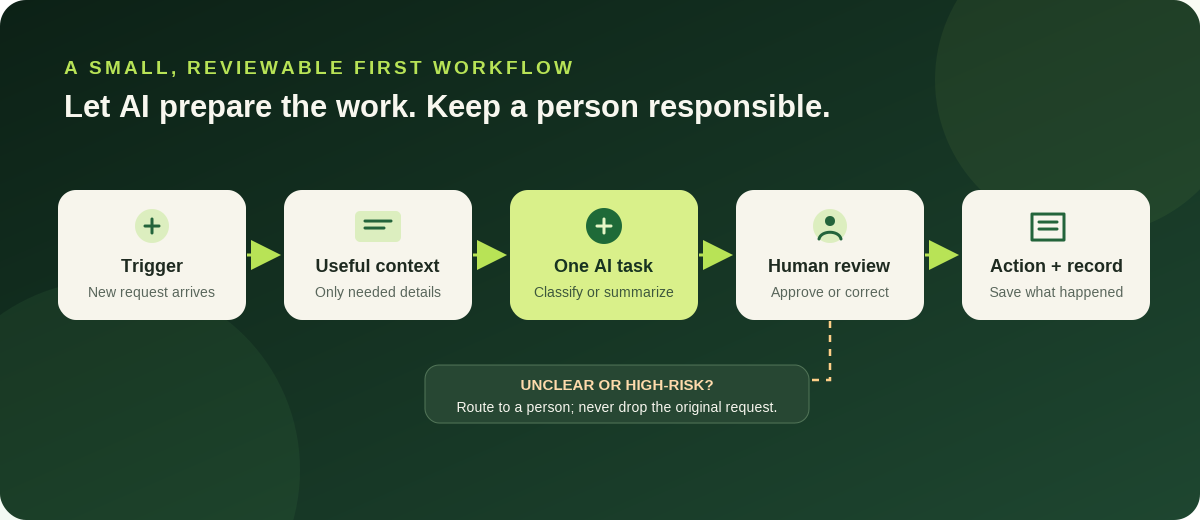
AI workflow automation combines a defined process with an AI-assisted step. A trigger starts the work, the system gathers relevant information, AI interprets something variable, and a rule or person decides what happens next. The workflow records the outcome.
Basic automation handles predictable steps: a booking can trigger a confirmation without AI. AI may help when a free-text inquiry needs categorizing or summarizing. Many useful workflows use regular automation for most steps and AI for just one.
| Approach | Best suited to | Small-business example |
|---|---|---|
| Manual task | Rare, unusual, or judgment-heavy work | Discussing a one-off customer exception |
| Rule-based automation | Clear inputs and predictable steps | Sending a booking confirmation after a form is submitted |
| AI-assisted workflow | Repeated work with information that varies | Summarizing an inquiry and suggesting a service category for review |
| Autonomous AI agent | Broader systems that can choose and take multiple actions | Often more authority and complexity than a first workflow needs |
A practical rule: if a fixed instruction solves the problem, start there. Add AI when the work involves language, context, or variation that simple rules cannot handle well. The U.S. Small Business Administration similarly recommends starting small, testing for value, and considering both benefits and risks in its guide to AI for small business.
AI automation examples for small business
These are useful starting points because they reduce repeated handling while leaving important decisions with a person. They can often be built around tools a business already uses.
| Workflow | What AI can do | Keep a person responsible for |
|---|---|---|
| New inquiry triage | Summarize the request, identify likely service type, flag missing details | Confirming fit, urgency, price, and promises |
| Email and support sorting | Group messages by topic and draft a reply from approved policy notes | Approving sensitive, upset, unusual, or policy-related replies |
| Meeting follow-up | Turn a transcript or notes into decisions, tasks, owners, and due dates | Checking commitments and assigning the right owner |
| Document intake | Extract fields from routine forms or documents and flag omissions | Verifying amounts, identity, and anything used for a formal record |
| Content repurposing | Make a draft summary, outline, or social post from approved source material | Fact-checking, editing, and approving anything published |
For example, an AI tool can label an incoming inquiry as “lawn care,” “website project,” or “unclear,” then create a short summary for the owner. A person can review the label before responding. That is more dependable than asking an agent to negotiate price, promise a start date, and send a binding quote without review.
Hard2Simple’s AI marketing operations walkthrough shows one real example of connecting repeatable content and media tasks into a working system. It also explains where human judgment remains part of the process.
How to choose what to automate first
Do not begin with “Which AI tool should I buy?” Begin with a task that causes friction. Write down what starts it, what information people need, what decisions they make, and how they know it is finished. If the steps change every time, simplify the process before automating it.
Score possible tasks from 1 (low) to 5 (high) on these factors:
- Frequency: How often does this task happen?
- Time or delay: How much effort or waiting does the current process create?
- Repeatability: Are the steps and expected result clear enough to explain?
- Reviewability: Can someone quickly spot a bad summary or draft before it causes harm?
- Reversibility: Can the action be corrected if the workflow gets it wrong?
Prioritize tasks that are frequent, well understood, easy to check, and reversible. Treat sensitivity and consequences as a brake: a workflow that changes a payment, gives financial advice, makes a hiring decision, or sends a high-stakes promise needs far more control—or should stay manual.
A five-minute workflow map
- Trigger: What event starts the task?
- Input: What information does the person doing it actually need?
- AI step: Is there a specific item to classify, extract, summarize, or draft?
- Check: Who reviews uncertain or consequential output?
- Finish: What action is taken, where is it recorded, and what happens if the workflow fails?
Build a first AI workflow around a real task
New-lead follow-up is a useful example for a service business. The goal is not to let AI sell on your behalf. The goal is to help a person understand a new request and respond sooner.
- Trigger: A prospect submits the existing website inquiry form.
- Prepare the input: Include only the form fields needed to route the request. Remove secrets and unnecessary personal details.
- Use AI for one bounded job: Ask it to summarize the goal, identify a likely service category, and list missing details. Tell it to return “unclear” when the information is insufficient.
- Set simple routing rules: Create an internal task or CRM note for a clear request; route an unclear or urgent message directly to a person.
- Keep the customer message controlled: Send a standard receipt that confirms the inquiry arrived. Have a person approve any personalized response, estimate, or commitment.
- Record the result: Save the summary, category, review status, and next step in the system the business already uses.
- Plan the failure path: If the AI call times out or returns invalid output, keep the original message intact and notify a person. Do not silently drop the request.
Start in “suggestion mode”: AI proposes a category or draft, and a person checks every result. Review enough examples to see where it succeeds and fails before automating low-risk steps.
If you are learning the basics first, Hard2Simple’s practical ChatGPT guide for small-business owners covers ways to get better assistance from a chat tool. For a deeper look at choosing an automation platform, see our n8n vs. CrewAI evaluation.
Measure the value of small-business workflow automation
Do not count every AI-generated output as a win. Measure the workflow against the current process. Before the pilot, record a baseline for a few weeks if the task volume allows it: time spent, time to first response, error or rework rate, and requests that were missed.
A rough time estimate is:
For a hypothetical example, 80 inquiries a month × 4 minutes saved each ÷ 60 equals about 5.3 gross hours. If review and maintenance take 2 hours, the estimated net time freed is about 3.3 hours. Those hours only create business value if they can be used for customer work, sales, delivery, or another real priority.
For a fuller comparison, subtract the total cost: software, integration, setup, staff review, and ongoing maintenance. Track one primary outcome and one safety measure. For lead triage, that might be median time to first human response and the percentage of categories corrected by staff. If speed improves while mistakes or customer complaints rise, the workflow is not ready to expand.
Keep AI workflow automation safe and dependable
A small team still needs clear boundaries. Decide what information may enter each AI tool, who can access the workflow, which actions require approval, and how errors will be noticed. Check the provider’s current data-use, retention, and security terms before sending customer or business information. Never assume that every AI plan treats data the same way.
- Minimize inputs: Pass only what the workflow needs. Avoid sensitive customer records unless the tool and process are approved for that use.
- Restrict permissions: Connect only the accounts and actions required. Keep credentials out of prompts and ordinary documents.
- Use a human checkpoint: Require approval before sending custom messages, changing records with consequences, issuing refunds, or making commitments.
- Keep an audit trail: Retain the input reference, model result, reviewer, action, and timestamp according to your business policy.
- Test exceptions: Try missing details, conflicting information, unusual requests, and tool outages—not only the clean example.
- Keep a manual fallback: Staff should know how to handle the task if an integration or AI service is unavailable.
NIST’s Generative AI Profile describes a risk-management approach for organizations using generative AI, including attention to testing, oversight, and third-party data risks. Its AI Risk Management Framework Core also calls for defined human oversight and documented responsibilities. You can scale those ideas down to a one-page checklist for a small workflow.
Run a small pilot before expanding
A short pilot can show whether the process is useful before you roll it out more widely:
- Days 1–2: Write the current steps and capture a baseline. Choose one owner for the workflow.
- Days 3–4: Map the trigger, approved inputs, AI task, review rule, result, and failure path. Test with sample or de-identified data.
- Days 5–7: Run the workflow in suggestion mode alongside the current process. Have a person compare its suggestions with the correct outcome.
- Week 2: Review misses, time saved, review effort, and exceptions. Fix the process or prompt before considering a limited live rollout.
Keep it, change it, or stop it based on evidence. If the workflow is hard to explain, often needs correction, or creates more review than it saves, that is useful information. A simpler rule-based automation—or a clearer process—may be the better solution.
Frequently asked questions
What is a good first AI automation for a small business?
Choose a repeated, low-risk task with clear inputs and outputs, such as summarizing inquiries, sorting an inbox, drafting internal notes, or turning meeting notes into a task list. Begin with human review.
Should AI send customer replies automatically?
For a first workflow, let AI draft or classify and have a person review. A fixed receipt or appointment confirmation may be safe to send automatically if its content is approved and the trigger is reliable. Personal promises, pricing, complaints, and unusual cases deserve human attention.
How much does AI workflow automation cost?
Cost depends on tools, integrations, setup, usage, and maintenance. Start by checking what is included in your current software, then compare the total cost with measured time freed, reduced delays, or additional service capacity. Avoid buying a large system before validating one use case.
For most small businesses, the useful question is not “How much can we automate?” It is “Which repeated task can we make easier without making the work less reliable?” Start there, keep people responsible for the outcome, and expand only after the first workflow earns its place.
Find a useful first workflow for your business
Bring a repeated task, question, or rough idea. Hard2Simple can help you decide whether AI, a straightforward automation, or a clearer process is the right next step.
Request a free consultation